As Mochi Health scaled its pharmacy network, partner pharmacies were still bouncing between Lifefile and other third-party tools to fulfill, verify, and ship Mochi orders. Some partner pharmacies told us directly that switching software mid-workflow was the biggest drag on their turnaround time, and an NPS survey across our broader pharmacy base backed it up, with recurring requests for inventory tracking and a real verification workflow inside our own portal.
V3 of the Pharmacy Portal set out to let pharmacies track GLP-1 inventory, assign orders to batches, and let pharmacists complete a Drug Use Review (DUR) all in one system, replacing the need for 3rd party tools for Mochi orders, and laying the groundwork for the portal to handle orders from any provider, not just Mochi.
Role & team
The team for this project consisted of a Project Manager, the engineering lead, and me, assisted by a pharmacy consultant and legal reviewer for all compliance requirements, such as batch data fields and verification requirements. I brought engineering in early rather than at handoff. The backend had specific constraints around how medication dosing was modeled, and catching that mismatch during design meant we avoided a late-stage rework (more on this below).
Discovery
I led discovery in two parts: understanding how pharmacy software works today, and understanding how our partner pharmacies actually work.
Competitive & cross-industry research
I first audited pharmacy-specific tools (Lifefile, PioneerRx) and found that nearly all of them supported prescription verification, but almost none had inventory management. To solve that part of the problem, I looked outside of healthcare products, studying how DoorDash, Amazon, and Shopify structure inventory, all with a product/catalog table paired with a separate stock table, each stock row tied back to a product ID.
That pattern mapped cleanly onto our existing Formulary feature, which already served as our version of a product catalog. Translating a familiar e-commerce pattern into a pharmacy batch-tracking model gave engineering a data structure they could actually build against, and gave pharmacists a mental model they already work with from other software.
Validation
Ethnographic interviews
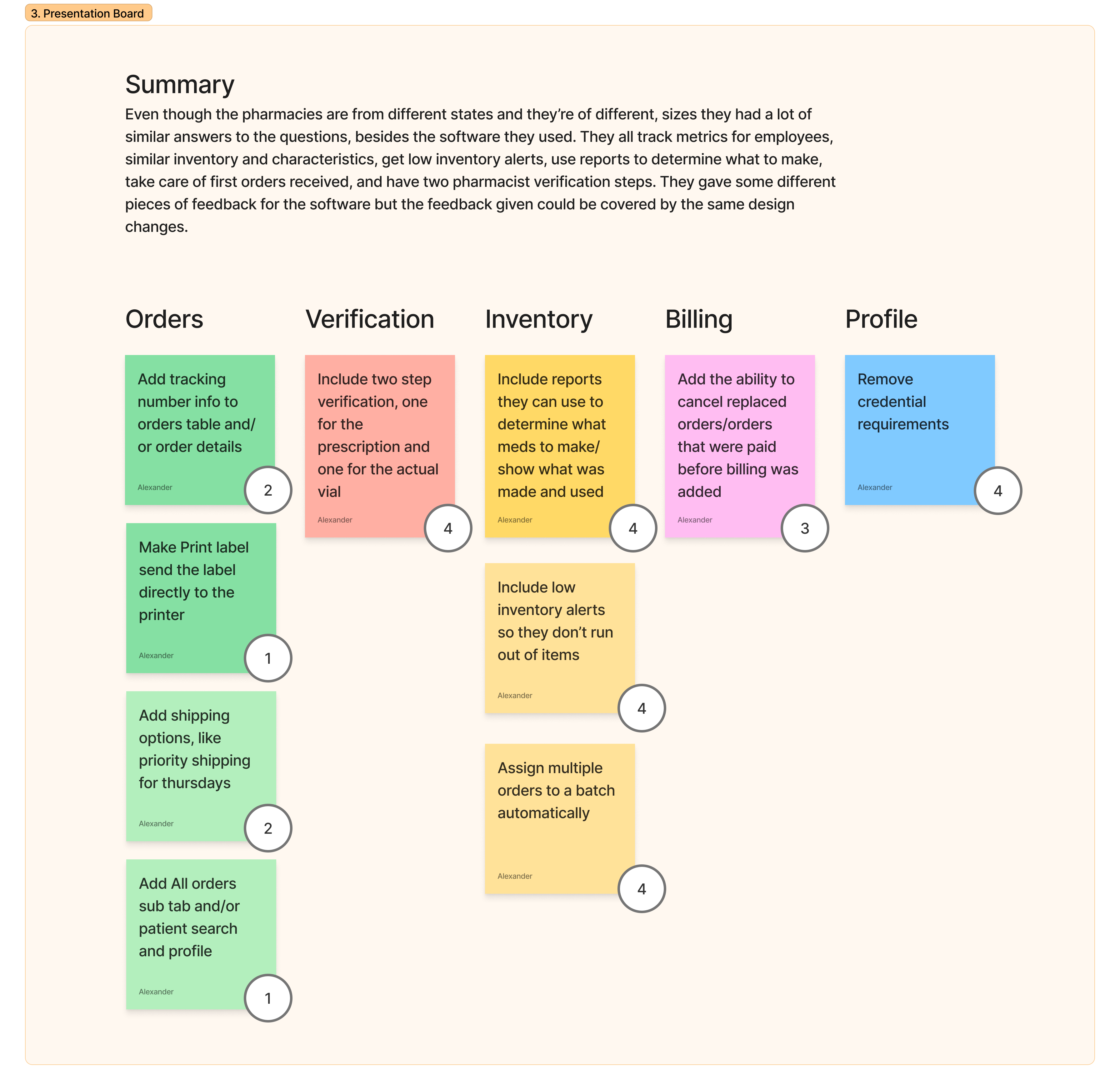
Using the competitor analysis and prior user research, I put together initial designs to show pharmacies during interviews, since they prefer having a visual to go off of. I conducted semi-structured interviews with pharmacists at four pharmacies, each in a different state, since pharmacy regulations vary by state. I showed my initial designs at the end of each interview rather than the start, so their answers about their current process weren't influenced by what I'd already built. Each session ran about an hour and covered their real fulfillment, verification, and inventory workflows.
Other requests that came out of research:
- Better inventory reporting
- Low-inventory alerts
- Removing pharmacy license upload friction
- The ability to delete stale orders
Final Designs
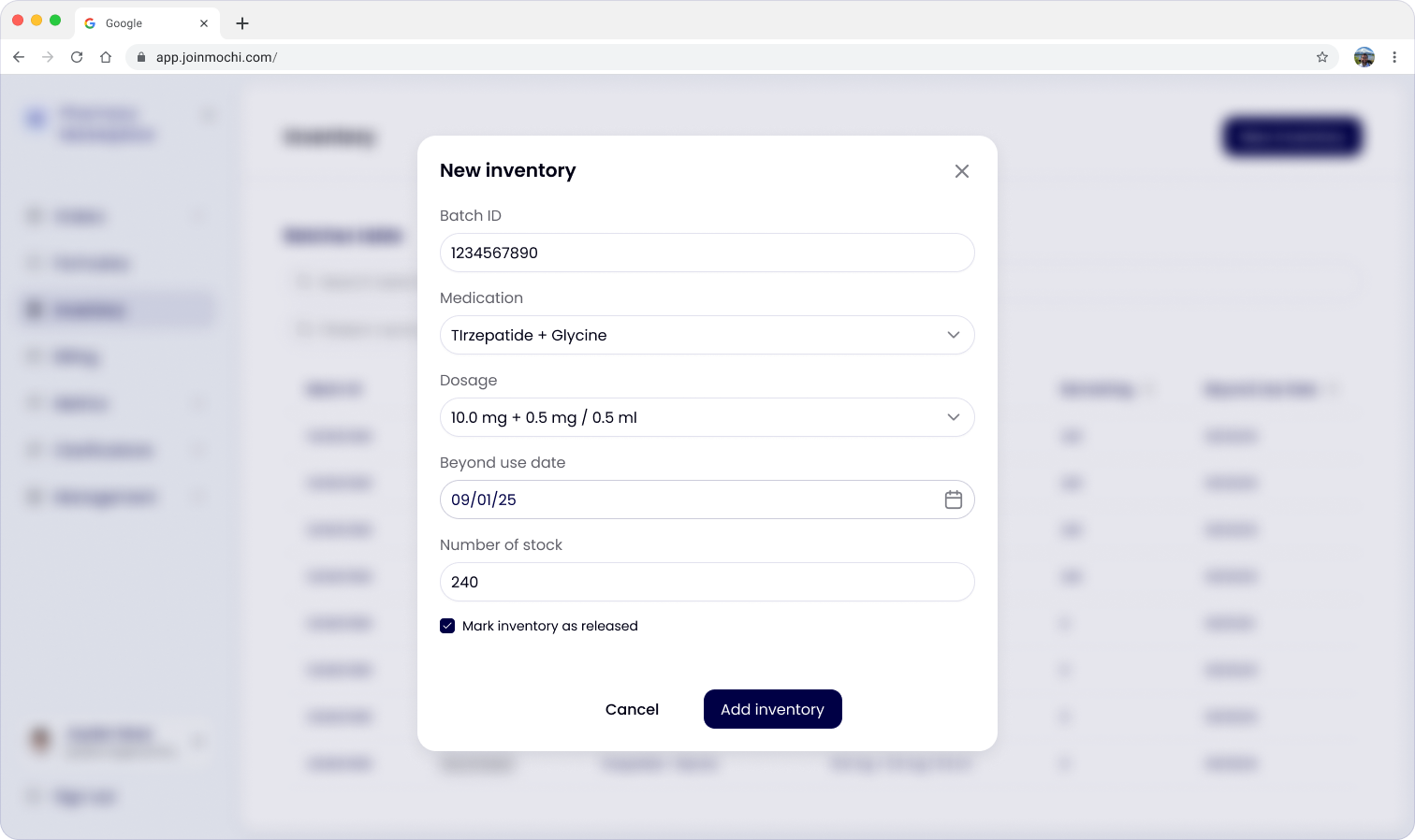
Add inventory
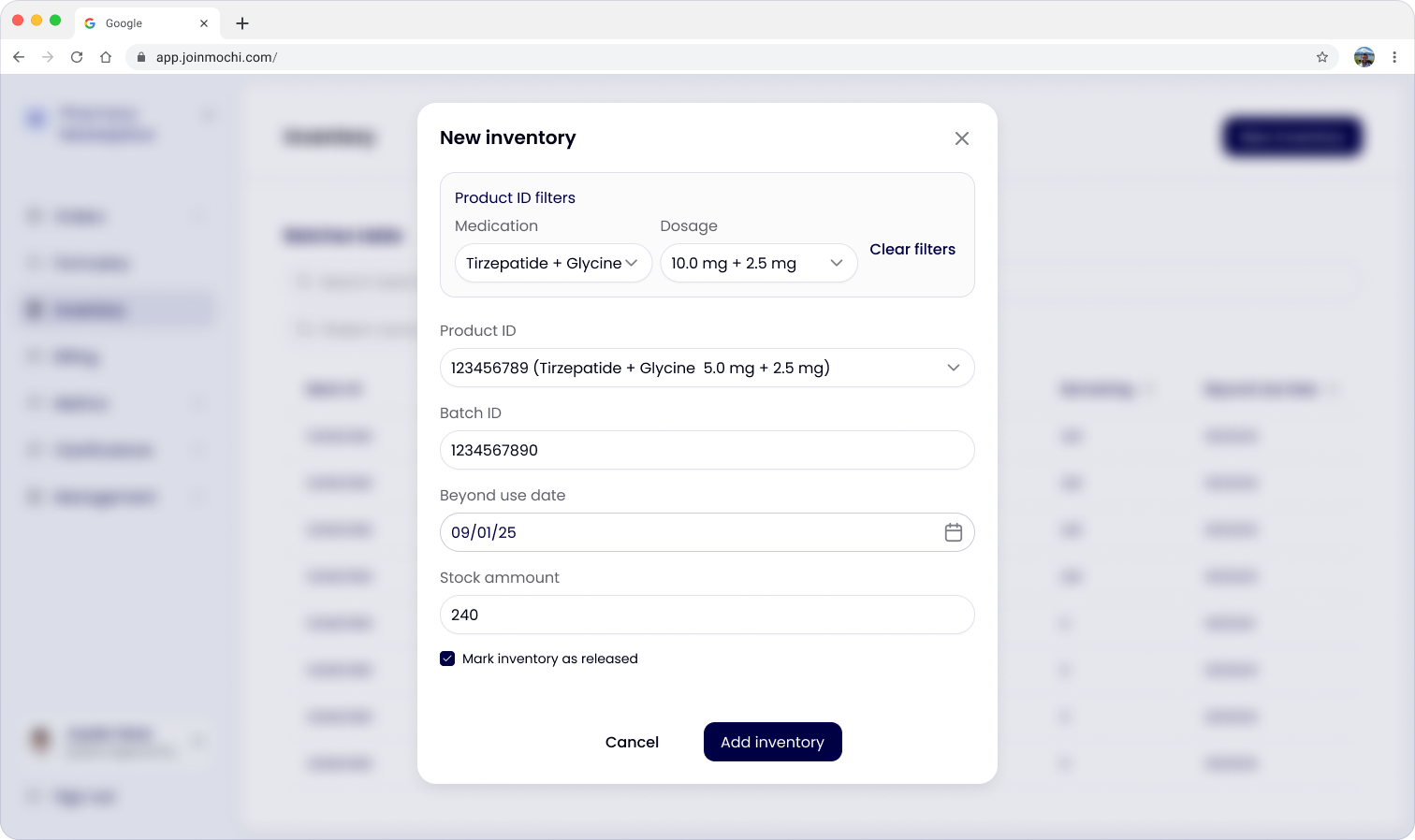
To add new inventory, a set of fields need to be filled out in a modal. I partnered closely with one of our pharmacy consultants and the legal team to learn what fields were required, and validated those with the pharmacies as well.
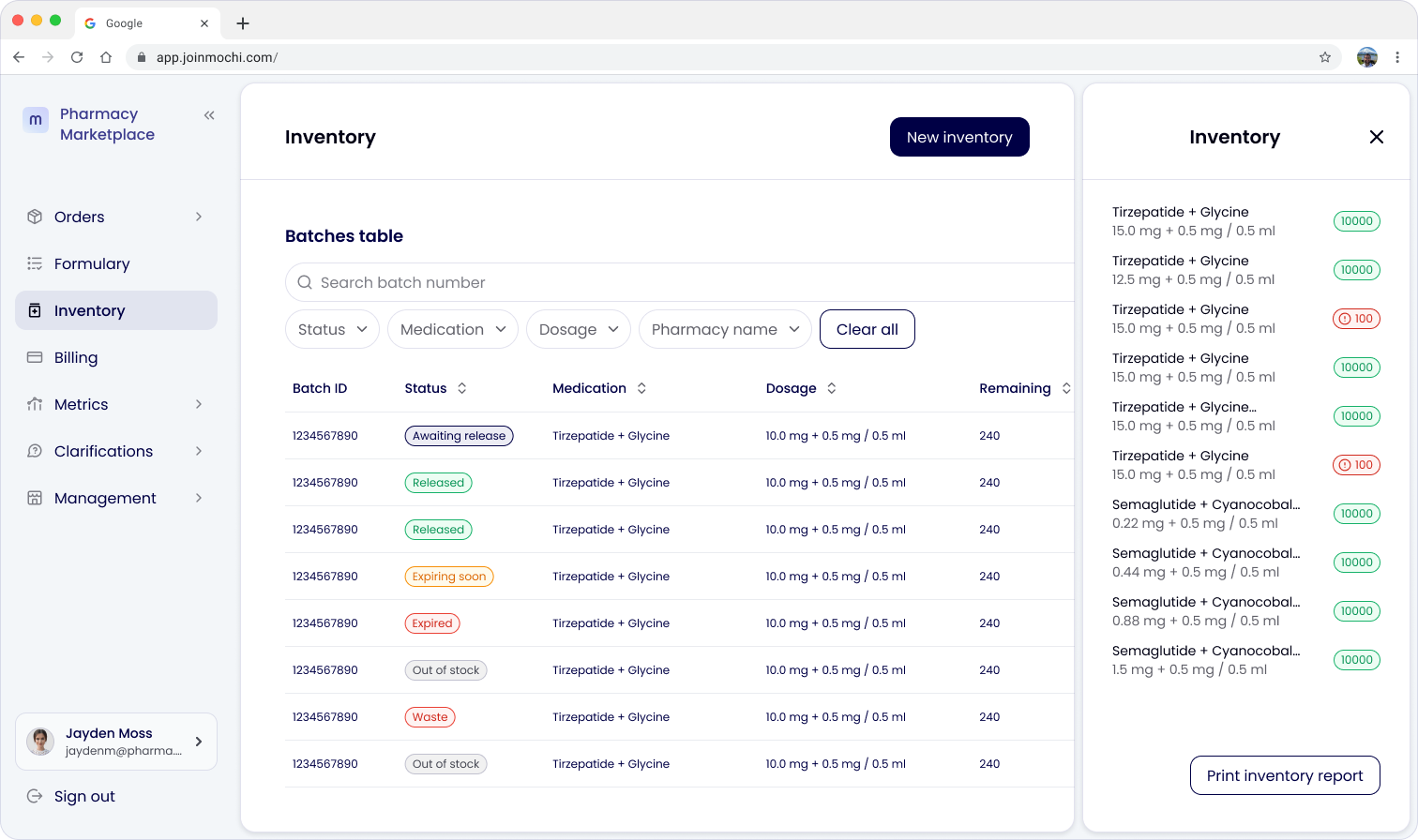
Inventory table
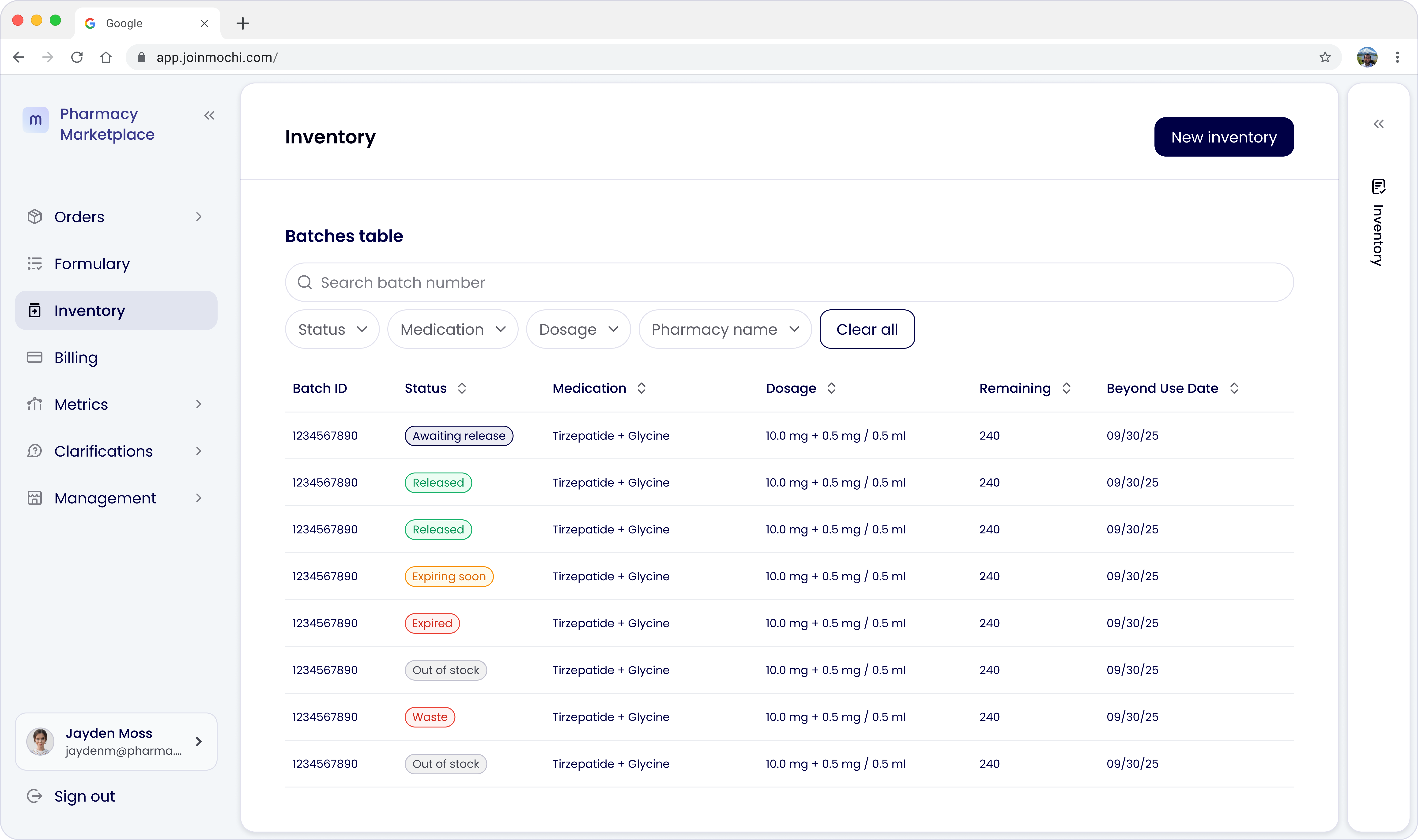
On the inventory tab, I created a table showing the amount for each row and its status. Pharmacies add a batch, and once it's compounded, a pharmacist marks it as Released for use with orders. I also added a side pane showing the total stock the pharmacy had for each medication, as a reminder of what they might need to make next, along with the better inventory reporting pharmacies had requested.
Inventory details
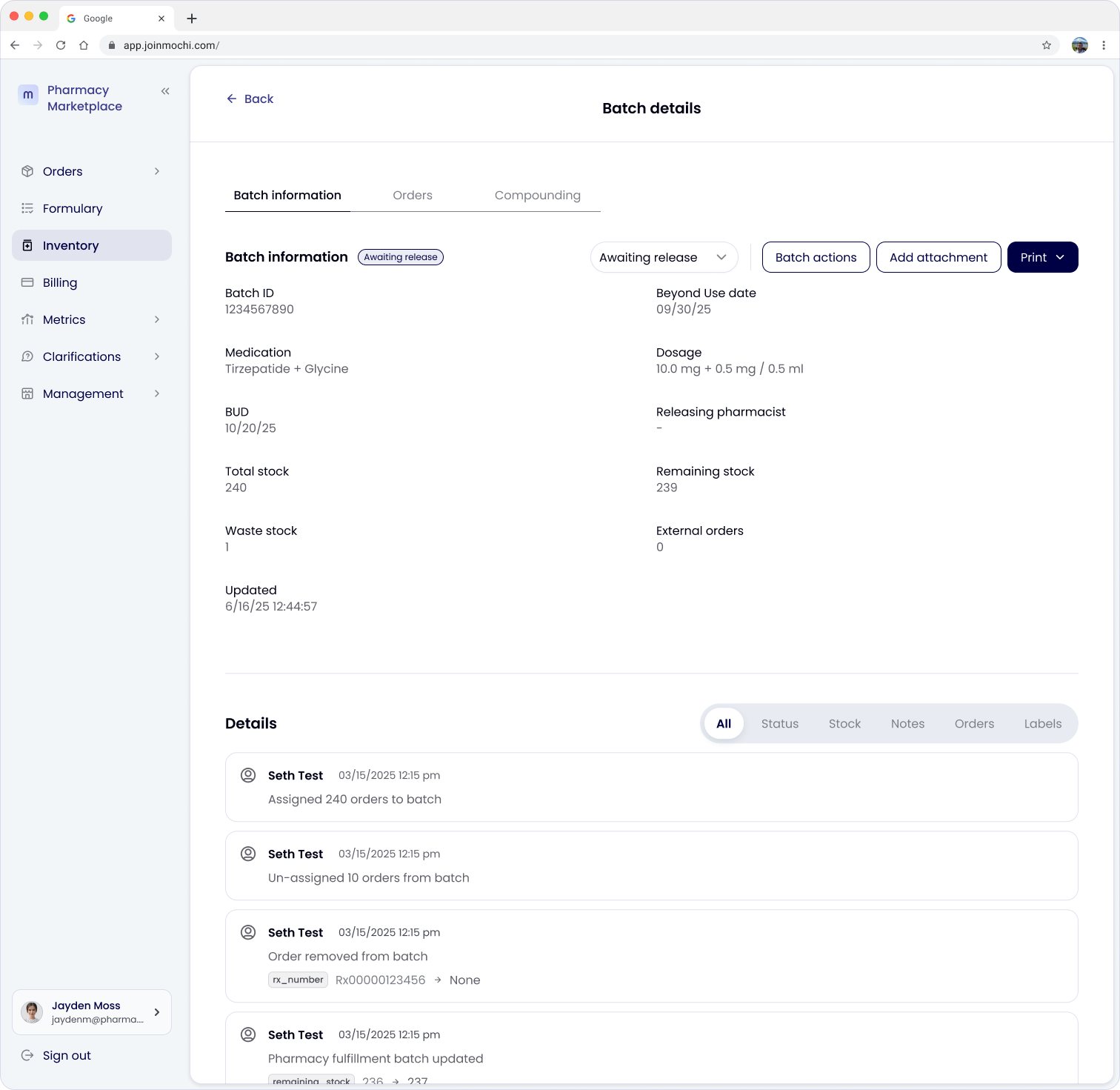
The inventory/batch details page was built in a format similar to the existing order details and payout details pages, with tabs to break up the dense information.
Edge cases
Rather than stopping at the happy path of how an order is fulfilled (add batch → assign order → verify → ship), I mapped out the failure and recovery states that might occur during pharmacy operations.
Batch lifecycle states. Awaiting release, Released, Out of stock, Expiring soon, Expired, and Waste. Working with engineering, we planned a system where a batch nearing its Beyond Use Date (BUD) doesn't silently get used on a new order.
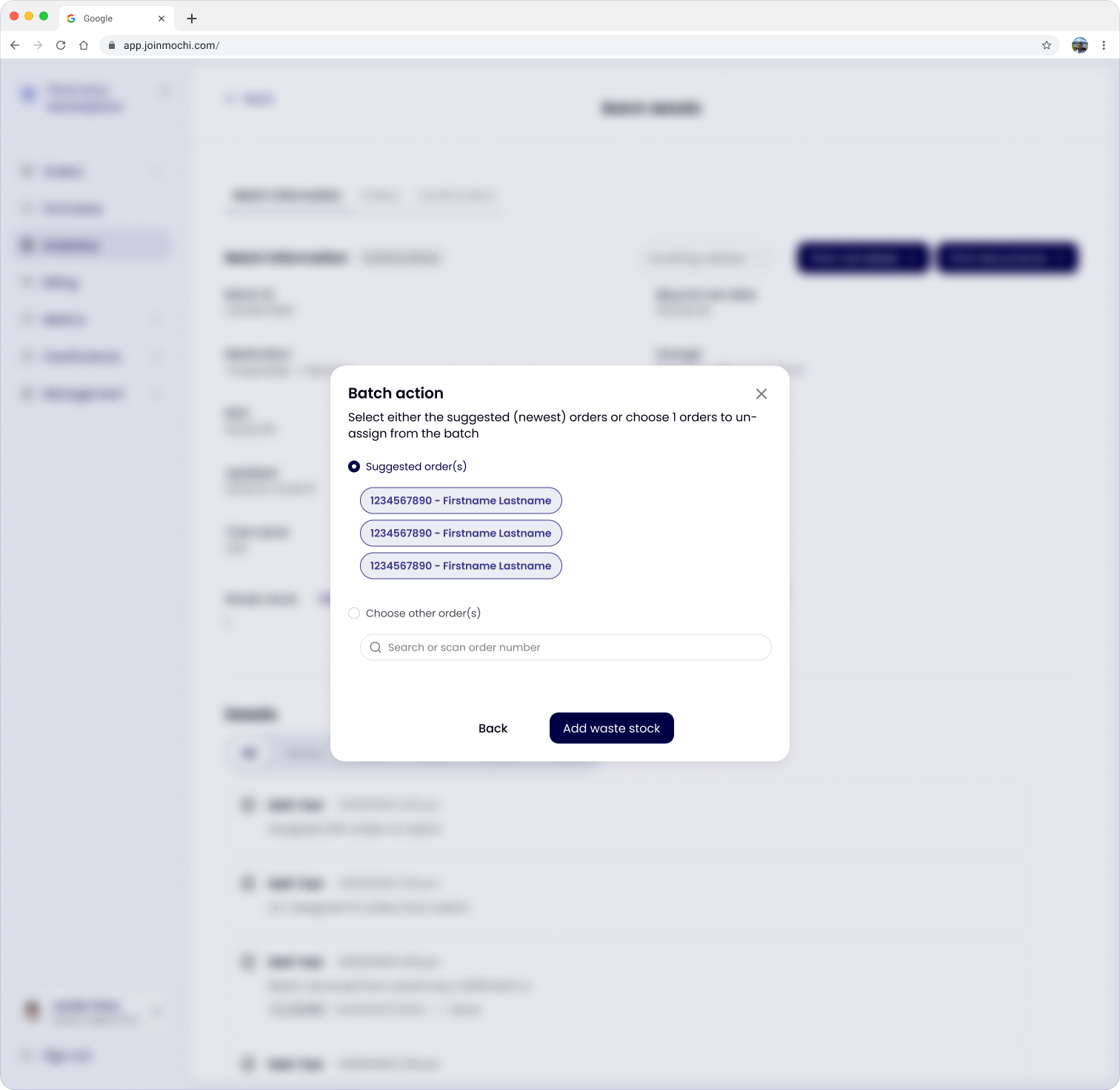
Stock correction flows. If a pharmacist or technician logs waste stock (a broken vial, particulates, external orders) and that pushes assigned orders above the new remaining stock, the system prompts them to un-assign orders. It surfaces the most recently assigned orders automatically, but also lets them search and choose orders directly. This keeps inventory correct and prevents assigning orders that wouldn't actually be fulfilled.
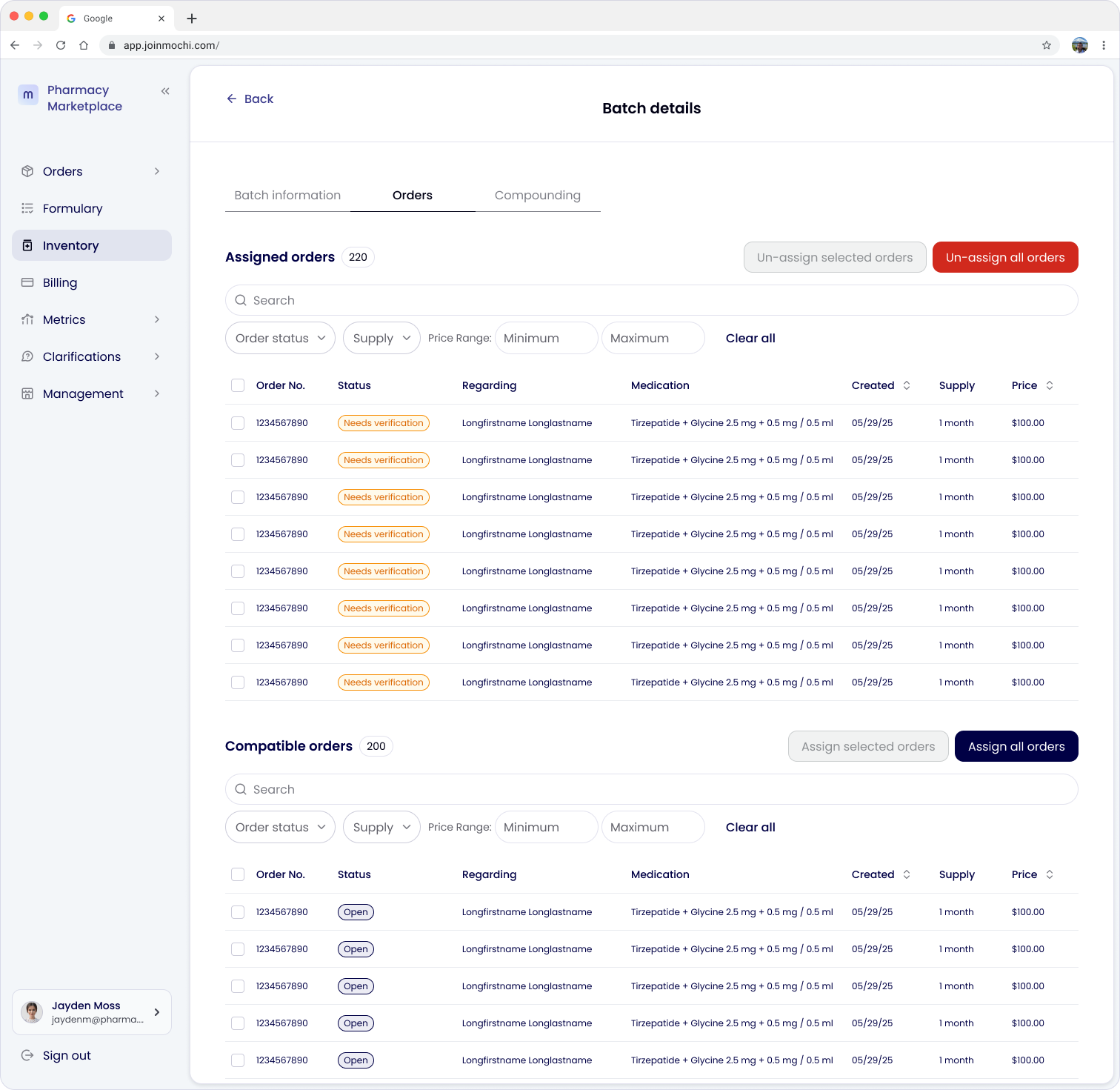
Guarded bulk actions. We discussed a global "un-assign all orders" action from the main Orders table, but I pushed back on it. If a batch's labels were already printed and physically attached to vials, a bulk un-assign could create a mismatch between what's tracked digitally and what's sitting in a pharmacy's fridge. We kept un-assign actions at the batch level and in the "Needs verification" Orders subtab views only, trading a small amount of convenience for lower operational risk, especially since pharmacies didn't ask for or imply the need to un-assign all orders at once.
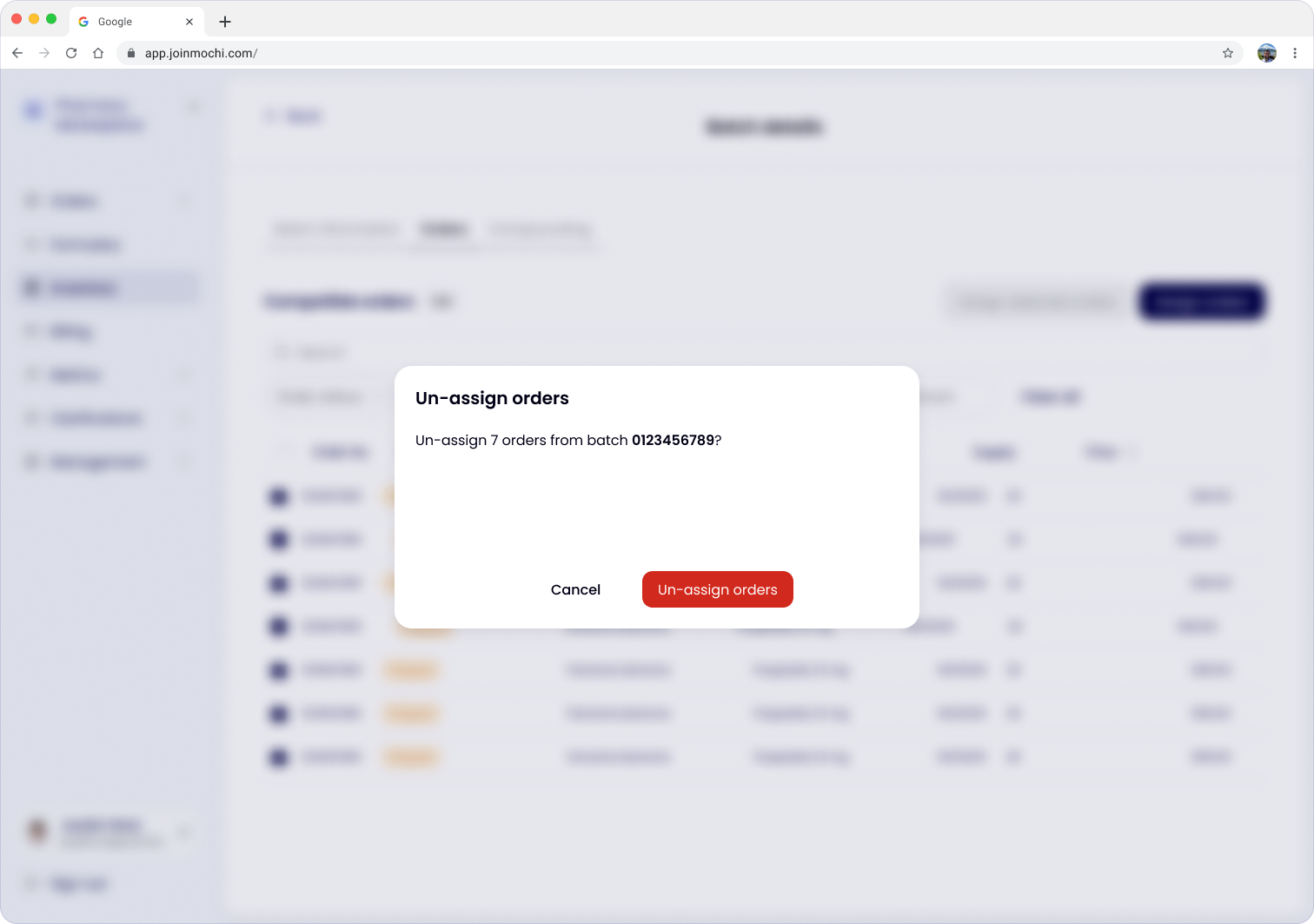
Despite seeming like small changes, these were all thought-out requirements. Each consideration came directly from a failure a pharmacist described during the user interviews, or was flagged as an operational risk during design reviews with the team.
Order verification
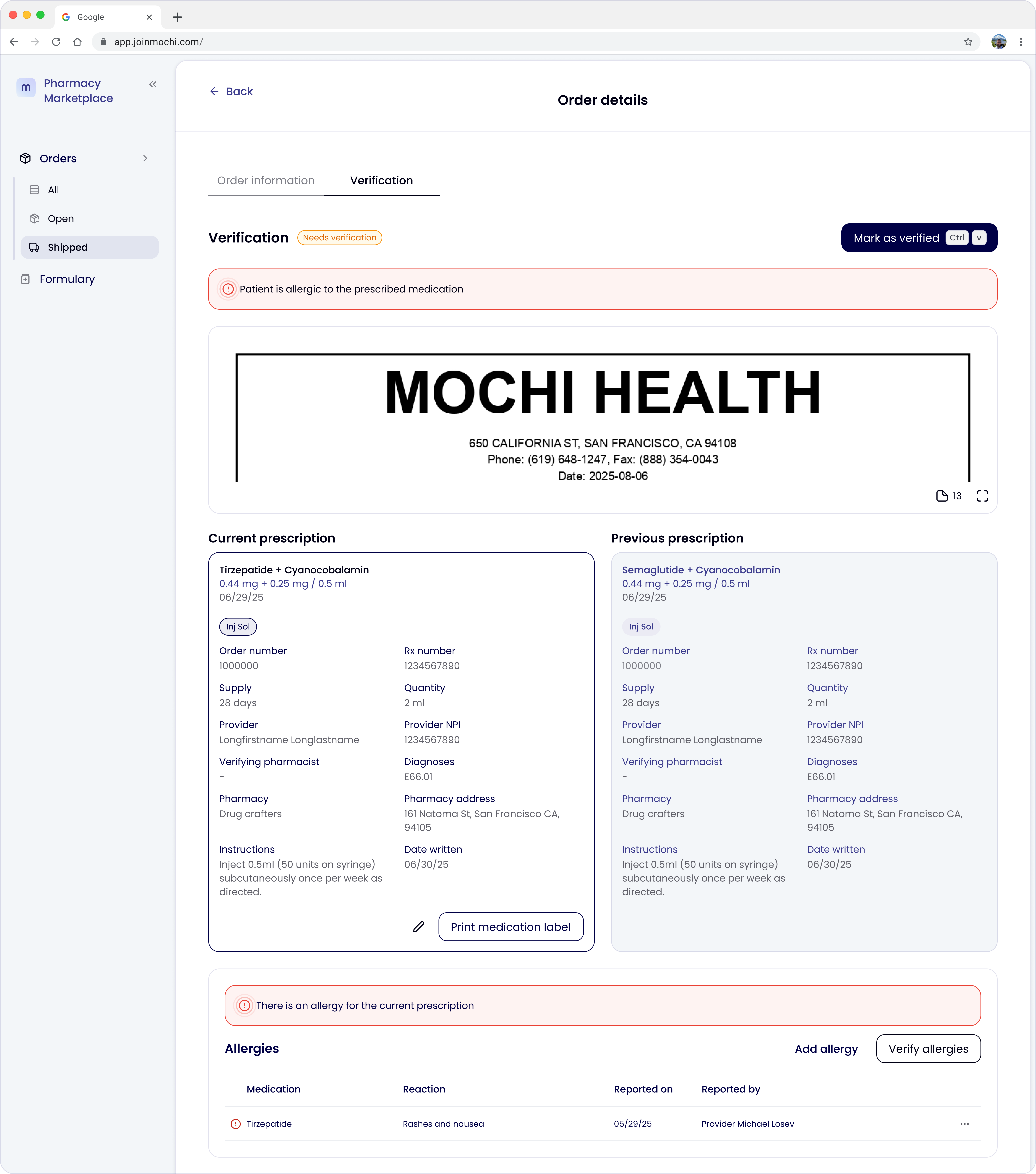
Once we knew data verification and product verification needed to be distinct steps, I redesigned the Verification tab around how pharmacists actually work. I split the "Verify order" button into two, and pinned the prescription document on one side while patient data (current vs. previous prescriptions, active medications, allergies, diagnoses) stayed pinned on the other. Pharmacists do this review almost exclusively on large desktop monitors, where they're comparing the two sides constantly. On smaller screens, the same content collapses into a single column rather than losing information.
.png)
Considerations with the backend:
- A verification safety net. If a pharmacist tries to mark data as verified without having verified every underlying table (allergies, medications, diagnoses), the system blocks the action and surfaces exactly which sections still need review before they can proceed.
- Data verification can occur at any time, but the order needs to be assigned to a batch for product verification to happen.
Automatic allergy and drug-interaction alerts are shown in these tables so a conflict can't be missed in a busy review queue.
Prototype
Given how complex these workflows were, static specs weren't going to communicate the interactions clearly enough to engineering. I built a clickable prototype in Lovable, my first real use of an AI-assisted vibe-coding tool. Rather than using the generic generated screens, I fed the tool my existing design system and screens, then evaluated everything it produced against three checks:
- Did it reuse existing components instead of inventing new ones?
- Did the interaction logic actually match the rules we'd defined (like a BUD-based sort order, or adding waste triggering the un-assign flow)?
- Was it feasible given engineering's current data model? This last check is what surfaced the dosage-mismatch problem early on.
The result was a prototype engineering could click through and question directly, which made the intended behavior and interactions clear.
Click here to view the prototype.
Handoff & development
I stayed involved through development rather than handing off and disappearing. The biggest change during the build was that Mochi's dosing doesn't always map 1:1 to a pharmacy's actual products. For example, Mochi offers compounded tirzepatide at both 5.0 mg and 10.0 mg, but some pharmacies only stock 5.0 mg vials. Two 5.0 mg vials would need to be assigned to a single 10.0 mg order instead. I added a product ID field with filtering to the inventory addition flow so pharmacies managing 20+ product IDs could handle this without confusion, then validated the fix directly with three pharmacies whose dosing I knew didn't line up cleanly with Mochi's. After adjusting field names and inline instructions, technicians and pharmacists confirmed they understood how to enter and assign inventory correctly.
We also agreed to pilot the feature with a handful of pharmacies for a few weeks before full rollout, treating the early launch as another checkpoint for validation, not the finish line.
Outcomes
- Features were implemented and delivered on a shortened timeline with no urgent post-launch fixes, due to involving engineering early and validating designs (like the pharmacy dosing mismatch) with real pharmacies before it shipped.
- Directly tied to the program's stated goals of reducing order turnaround time and cutting the number of orders running past the 14-day late threshold, by removing the need to switch tools mid-fulfillment.
Reflection
The hardest part of this project was that pharmacy workflows don't have clean comparisons anywhere else. I had to research e-commerce inventory systems, then adapt them to clinical and legal requirements that don't show up in those more generic products. I'm grateful to have worked with pharmacies willing and eager to give feedback on the features I work on. It kept my designs focused on what they truly needed. Bringing engineering in from the start, and using an interactive AI-assisted prototype to make the intended behavior tangible rather than describing it in a spec, meant the riskiest flows got tested with real pharmacies and real engineers well before launch, giving us a smooth rollout.